Using AI to Code for Squarespace: Why You Still Need the Basics
Building a website on Squarespace used to mean working within strict template boundaries. But as AI tools become more common, many people wonder if they can use artificial intelligence to write custom code for their Squarespace sites.
The short answer is yes, sort of. But does it replace the need for having basic coding knowledge? No.
This question comes up a lot in web design communities. I've seen people get excited about AI-generated code snippets, only to run into problems when something breaks or needs updating. The reality is more complex than just copying and pasting AI-generated code into your site.
Let's explore the benefits and drawbacks of using AI for Squarespace coding, and whether taking a basic coding course might still be worth your time.

Benefits of using AI to write code.
AI coding tools can be incredibly helpful for Squarespace customization. They offer several clear advantages that make them attractive to website owners.
Speed and efficiency are probably the biggest benefits. Instead of spending hours researching CSS properties or JavaScript functions, you can describe what you want and get code written for you in seconds.
Learning opportunities also emerge when you use AI thoughtfully. You can ask the AI to explain each line of code it generates. This helps you understand what's happening behind the scenes, even if you don't have formal coding training.
Cost savings make AI particularly appealing. Hiring a developer for custom Squarespace modifications can cost hundreds or thousands of dollars. AI tools often cost less than $20 per month, making them accessible for small business owners and personal projects.
24/7 availability means you can work on your website whenever inspiration strikes. No need to wait for developer availability or work around someone else's schedule.
The barrier to entry becomes much lower with AI assistance. You don't need years of coding experience to add custom functionality to your Squarespace site. Simple modifications like changing fonts, adjusting spacing, or adding hover effects become achievable for beginners.
Drawbacks of using AI to write code.
Despite these benefits, AI-generated code comes with significant drawbacks that can create problems down the road.
Quality inconsistency is a major concern. AI tools sometimes generate code that works initially but breaks when Squarespace updates its platform or when you make other changes to your site. The code might also be inefficient, using more resources than necessary or conflicting with other code on your site.
Debugging challenges become apparent when AI-generated code doesn’t work or stops working. If you don't understand the code, fixing problems becomes nearly impossible. You'll likely need to start over or hire someone who can identify and fix the issues.
Limited customization occurs because AI tools work with patterns they've seen before. They struggle with highly specific or unique requirements that go beyond common use cases. You might get close to what you want but miss the exact functionality you're looking for.
Dependency issues develop when you rely too heavily on AI for all your coding needs. What happens when the AI tool changes its pricing, shuts down, or stops working effectively? You're left with code you can't maintain or modify.
Example of Using AI to Write Code
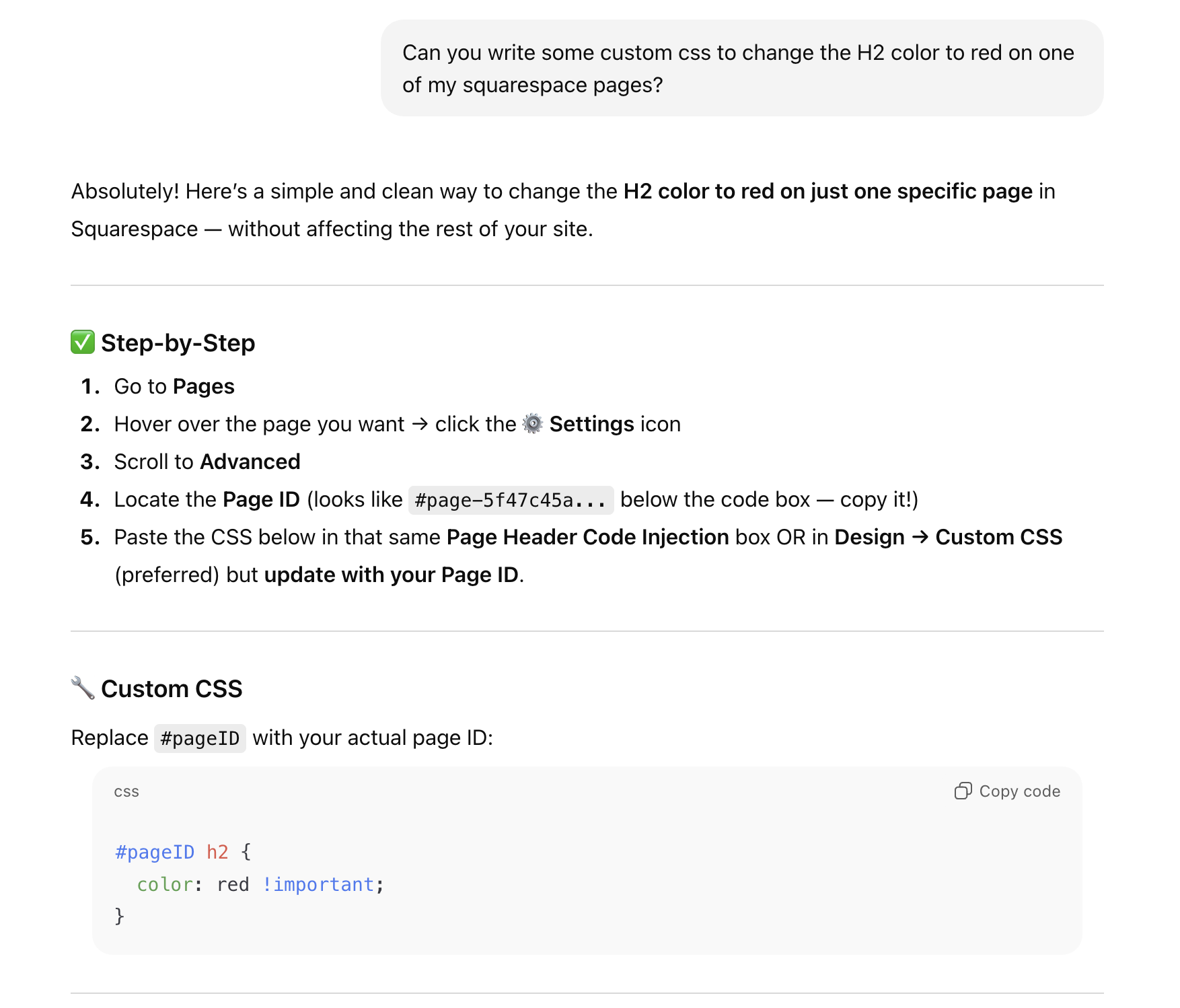
Let me share a quick example of why having some basic coding knowledge is still essential, even when you’re using AI tools like ChatGPT.
I asked ChatGPT to write CSS that would change the color of an H2 on a specific page of my Squarespace site. It gave me the code and then explained how to find the page ID, but the method it suggested wasn’t correct. When I asked for alternatives, only one of the three additional methods would actually help someone locate the right page ID. Once I provided the correct one myself, it was able to generate working code and even provide a few additional suggestions.
Then I asked it to modify the code for Paragraph 3 text styles — but it struggled to identify the correct class name.
After several back-and-forth prompts, we eventually got close to the right code. But the only reason I could guide the conversation and fix issues was that I already knew the proper class names.
This is a perfect example of how AI can sometimes create more confusion when you don’t have foundational knowledge. A little CSS know-how made the solution quick and simple. Plus, in reality, both of these bits of code are super simple and quick to write if you know the basics of HTML and CSS.
What about an AI tool built for Squarespace
Specialized AI tools designed specifically for Squarespace offer a middle ground between general AI coding assistants and learning to code from scratch. Custom Codey by Inside the Square is one such tool that focuses exclusively on Squarespace customizations.
Platform-specific knowledge makes these tools more reliable than general AI assistants. Custom Codey understands Squarespace's structure, common issues, and best practices. It knows which CSS selectors work with different Squarespace templates and how to avoid conflicts with the platform's built-in styling.
Pre-tested code snippets reduce the likelihood of broken functionality. Because the tool focuses on one platform, it can maintain a library of proven solutions that work across different Squarespace templates and versions.
Squarespace-specific guidance helps users understand how their customizations fit into the broader platform. Instead of generic coding advice, you get instructions tailored to Squarespace's interface and limitations.
However, specialized tools still have limitations. They can't replace fundamental understanding of code. If Custom Codey generates code that needs tweaking for your specific situation, you'll still need basic HTML and CSS knowledge to make adjustments.
Conclusion
AI can definitely help you write code for Squarespace, but it works best when you have at least basic coding knowledge to guide and troubleshoot the process. Think of AI as a powerful assistant rather than a replacement for understanding code.
If you're serious about customizing your Squarespace site, I recommend taking a basic HTML and CSS course alongside using AI tools. You don't need to become a professional developer, but understanding core concepts will help you use AI more effectively and solve problems when they arise.
The combination of AI assistance and foundational knowledge creates the best results. You'll work faster than learning everything from scratch, but you'll also have the skills to maintain and modify your code over time.